
05.7 View, refresh and export
Read a dashboard, refresh it, see how fresh its data is, and export it as PDF or its widgets as Excel, CSV or PDF.
Reading a board
Open it from Dashboards. Set the filters 1 at the top; every widget follows.
Each widget has tools in its top-right corner:
- ↻ Refresh 2: read the numbers again. This refreshes the whole board.
- ⤢ Expand 3: show the widget full screen. Charts and metrics can switch to Data to see the numbers behind them. Esc closes it.
- Export 4: download this widget’s data (below).
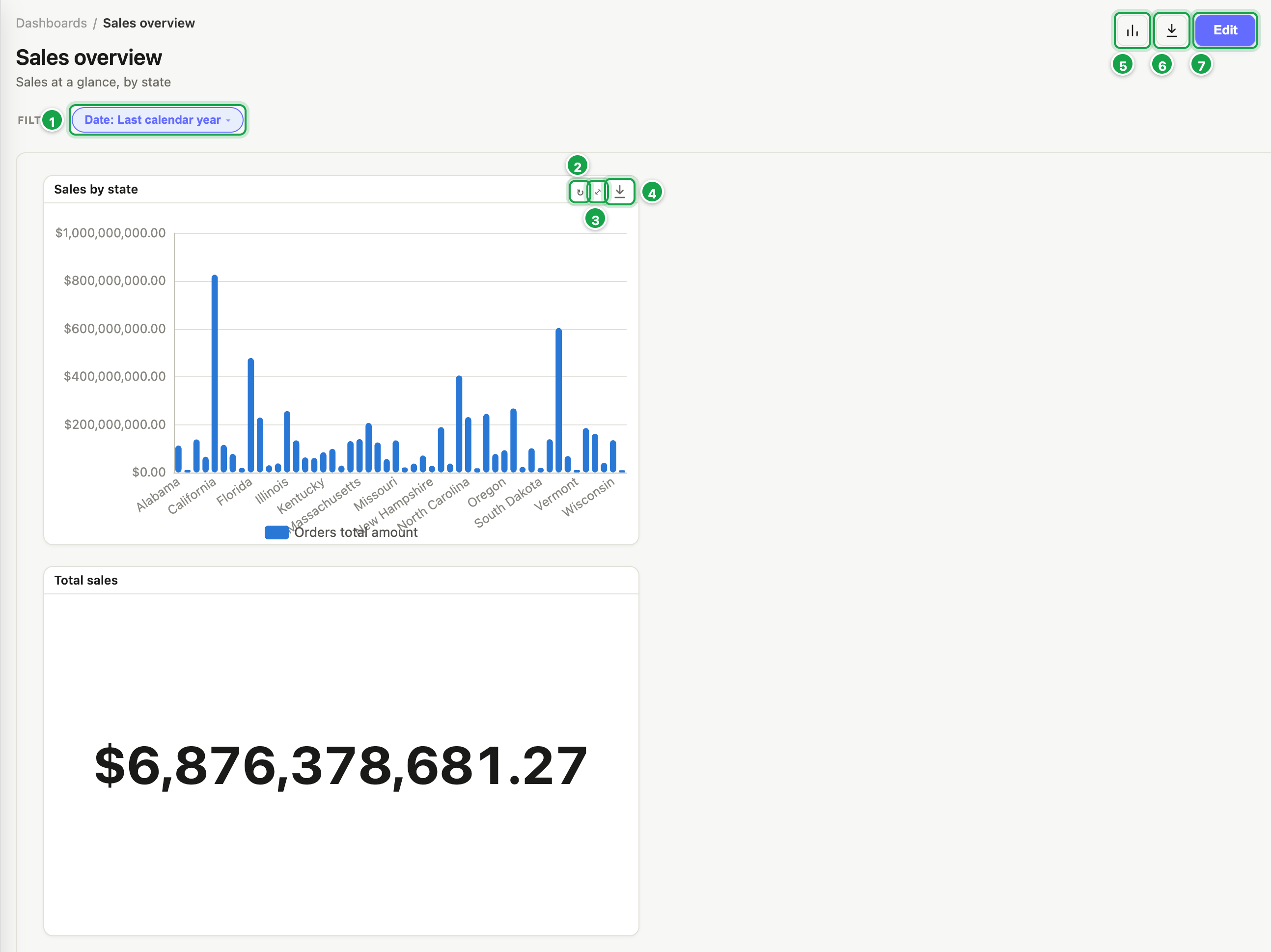
| # | What it is |
|---|---|
| 1 | The board’s filters |
| 2 | ↻ Refresh |
| 3 | ⤢ Expand |
| 4 | Export this widget’s data |
| 5 | Query stats |
| 6 | Export to PDF |
| 7 | Edit: open the designer |
While it’s working
- The first time, a progress bar shows rows being read.
- A clock shows how long it has taken. ✕ stops the run.
- When it re-runs, the previous numbers stay visible, marked Showing previous results or Refreshing, so the board never goes blank.
Fast repeat answers
Analytics keeps answers it has already worked out:
- Going back to filters you already used, or returning from the designer, is instant.
- When many people open the same board, the numbers are worked out once and shared.
- Boards on a cube keep their answers until the cube is rebuilt. Boards on a live database refresh their stored answers every few minutes.
- ↻ Refresh works the numbers out again for everyone. Everyday users can do this once every 30 seconds; admins any time.
More in 06.4 Fast repeat answers.
“Data as of …” (cube boards)
Boards built on cubes show Data as of 10:30 above the canvas. While a cube is being rebuilt, the board keeps showing the previous data and refreshes by itself when the build finishes.
Export
The whole board as PDF: in view mode, click Export to PDF 6. You get the board as it looks now: charts as pictures, tables with their rows (as many as fit), and the current filter values in the footer.
One widget’s data: the widget’s export menu:
| Format | You get |
|---|---|
| Excel | Formatted, still real numbers (up to 1,048,575 rows) |
| CSV | Raw values, all rows |
| As shown, first 5,000 rows |
Exports include all rows under the current filters, not just what fits on screen.
Query stats (for the curious)
Query stats 5 (the chart icon) shows each query’s time, rows read and returned. Useful when a board is slow and you want to tell IT which part.
Next: 06.1 Making things fast
Last updated 12 October 2026