
03.11 Build a dataset on another dataset
Use one dataset's result as if it were a table in another: clean data once, then summarise, join or stack it in as many datasets as you need.
A dataset can read another dataset instead of a table. Prepare the rows once (the right filter, the right joins, the right names) and build on them everywhere, instead of repeating the same steps in each dataset.
Worked example: delivered orders with the customer’s name
Delivered orders keeps only orders whose status is delivered. Delivered orders with customers builds on it and adds each customer’s name.
- Make the first dataset as usual: Delivered orders, the orders table, a filter order_status equals delivered, columns id, customer_id, shipping_state, total_amount. Save it.
- Make a second dataset on the same connection: Delivered orders with customers.
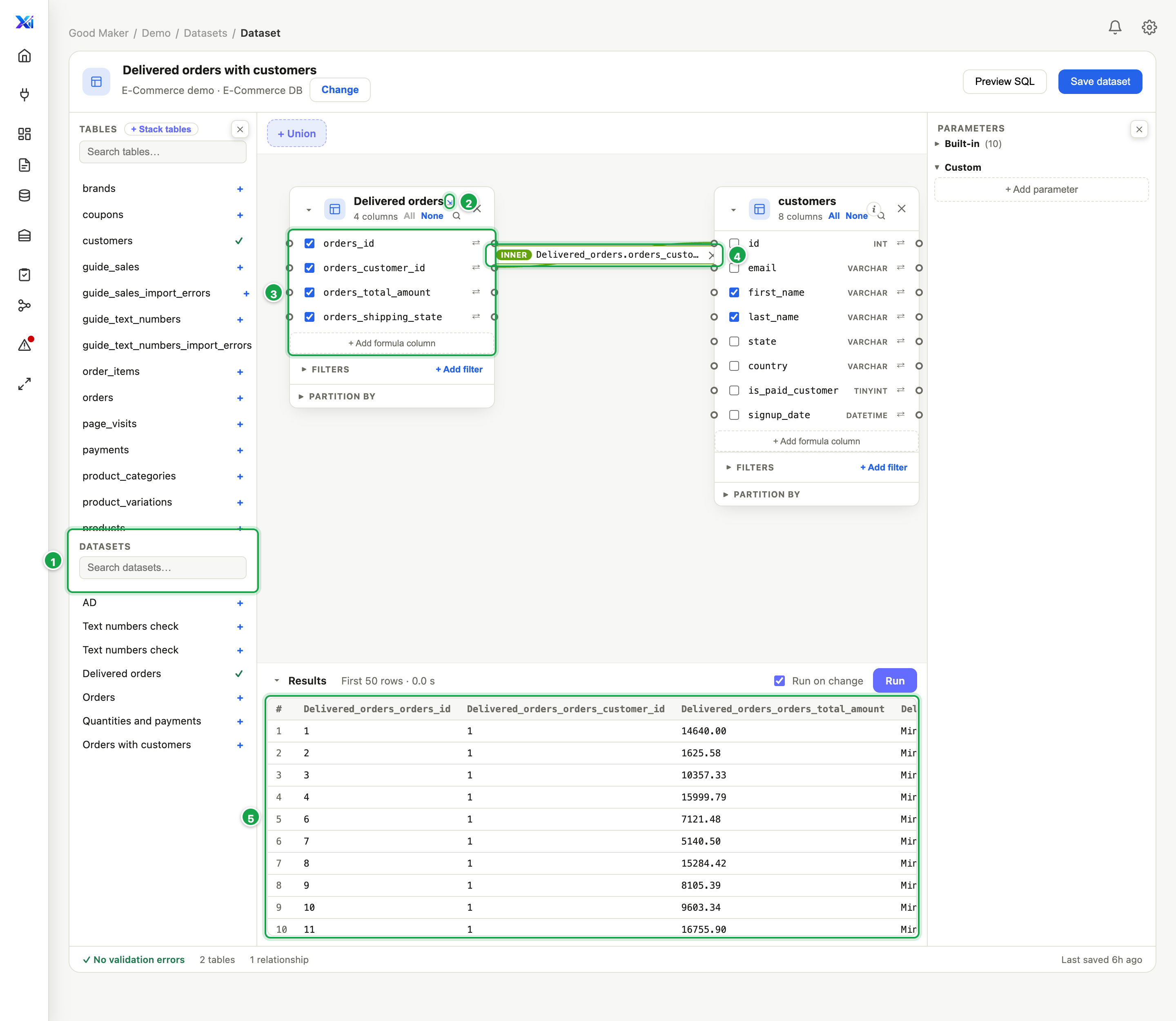
- In the left panel, under Datasets 1, click Delivered orders. It lands on the canvas like a table, marked ⇲ 2.
- Its columns 3 are the first dataset’s results, named as it names them: orders_customer_id, orders_total_amount…
- Place the customers table and join orders_customer_id to id 4 (03.3).
- Run: delivered orders only, each with its customer’s name 5. Save dataset.
| # | What it is |
|---|---|
| 1 | Datasets: others on this connection. Click one to place it. |
| 2 | ⇲: this card is a dataset, not a table |
| 3 | Its columns: the other dataset’s results, named as it names them |
| 4 | Joined to the customers table like any table |
| 5 | The result: delivered orders, with the customer’s name |
What you can do with it
- Join it to tables or other datasets, like any table (03.3).
- Stack it with others: + Stack tables lists datasets too (03.8).
- Filter, add formulas, summarise on top of it.
- Change the first dataset and every dataset built on it follows: it is read fresh each run, not copied.
Good to know
- Only datasets on the same connection are offered. A dataset on another database cannot be read inside this one.
- A dataset cannot include itself, directly or through another. Saving such a loop is refused.
- Totals on its columns need one extra step. Columns from another dataset don’t carry their type, so Aggregate offers Group by but not SUM, AVG… To total one, convert it first: ⇄ → TONUMBER, then SUM on the new column. Or do the totalling in the first dataset.
- If the first dataset is deleted, the card says (dataset removed).
Next: 04.1 What a report is
Last updated 13 October 2026