
04.1 What a report is
A report turns a dataset's rows into something people read: a grouped table with subtotals, a pivot with months across the top, or a chart.
Dataset (the rows) → report (how they’re shown)
The dataset decides which rows exist. The report decides how they’re grouped, totalled, formatted, filtered and drawn. One dataset can feed many reports.
Every dashboard widget is a report too. What you learn here works in dashboards.
The reports list
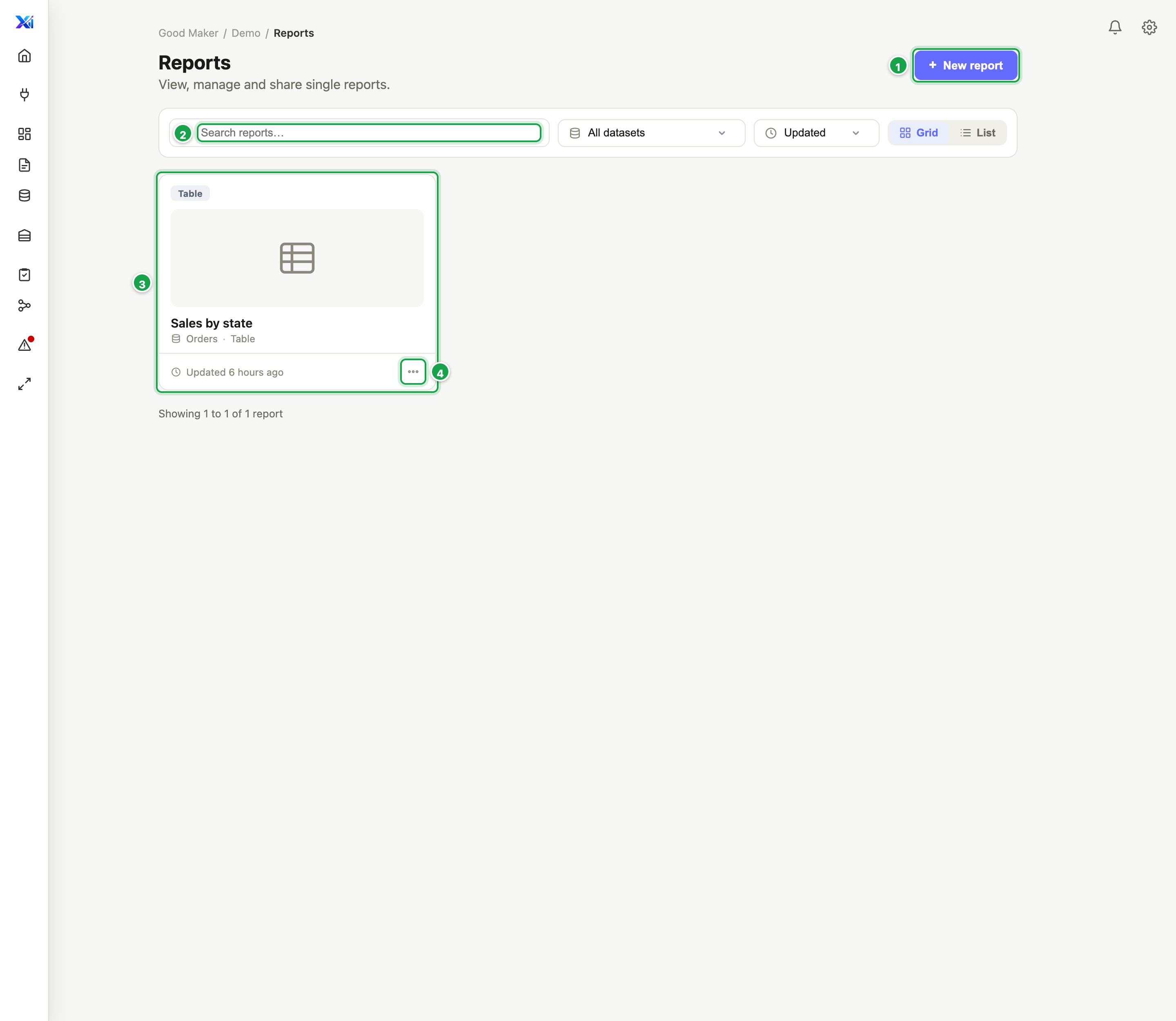
| # | What it is |
|---|---|
| 1 | + New report |
| 2 | Search reports…: names, descriptions and datasets |
| 3 | A report. Click it to read it. |
| 4 | …: Open, Edit or Delete |
Left menu Reports. Click + New report 1 to start one.
- Search reports… 2 searches names, descriptions and dataset names.
- Filter by dataset, sort by Updated, Created or Name, and switch between Grid and List.
- Click a report 3 to open it for reading. Its … menu 4 has Open, Edit and Delete.
Reports that live inside a dashboard (widgets) aren’t listed here. There’s no copy-a-report button yet.
View mode and design mode
| View | Design (edit) | |
|---|---|---|
| For | Readers | Whoever builds the report |
| Shows | Filters, the result, Chart, Export, View SQL, Refresh | Everything, plus the toolbar, column panel and options drawer |
| Data | The full result | A quick preview of the first 500 rows |
| Get there | Click the report | Pencil Edit report, or Edit in the list |
In this section
| Guide | Covers |
|---|---|
| 04.2 Create a report | Starting, datasets, saving |
| 04.3 Columns and formats | Which columns, names, number and date formats, units |
| 04.4 Group, total and sort | Rows, values, subtotals, grand total |
| 04.5 Pivot, top N and more | Columns across the top, top 10, running totals, streaks |
| 04.6 Filters | The date, column filters, the reader’s filter bar |
| 04.7 Formulas | Margin, ratios, calculated columns |
| 04.8 Charts | Drawing the result |
| 04.9 Row tags | Naming rows like A1, B1 |
| 04.10 Run and export | Running, stopping, Excel, CSV, PDF |
Next: 04.2 Create a report
Last updated 12 October 2026