
05.1 What a dashboard is
A dashboard (or board) is one page of widgets: tables, charts and single numbers, all sharing the same filters. Change the date at the top and every widget updates.
Each widget is a small report. When you build one you get the full report builder: columns, totals, pivot, formats, chart. So everything in 04 Reports applies to widgets too.
How a dashboard gets its data
Datasets → the dashboard’s Model → widgets
- A dashboard has a Model: the list of datasets it may use. You add them once.
- Every widget picks its columns from those datasets.
- The board’s filters narrow every widget at once.
Because all widgets read the same model, Revenue means the same thing on every card.
The dashboards list
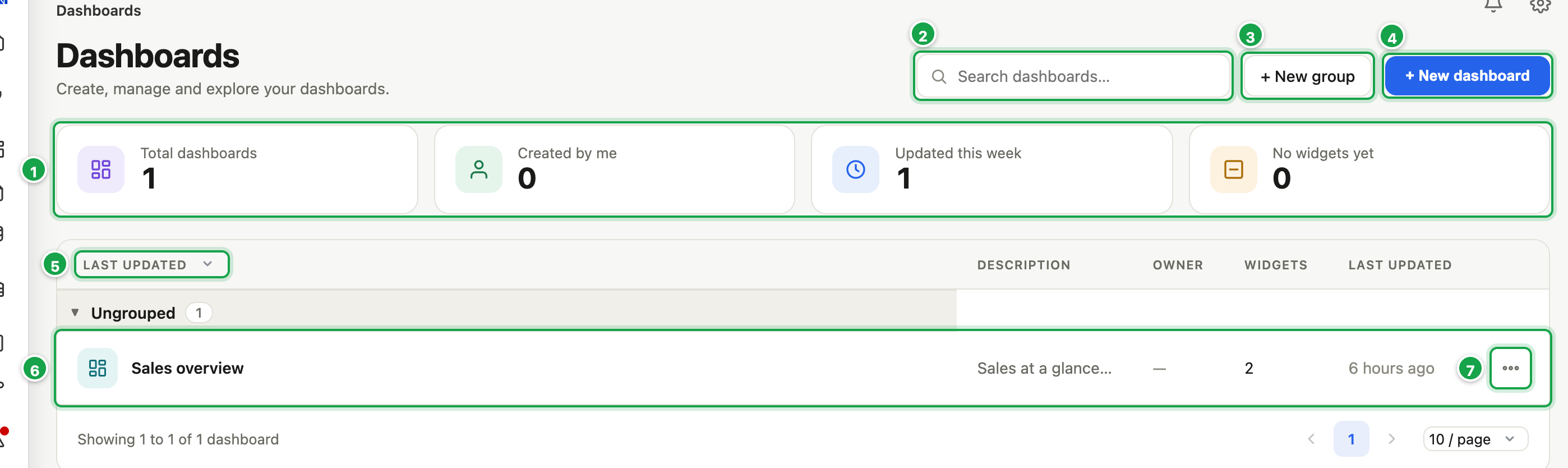
| # | What it is |
|---|---|
| 1 | Counters: total, yours, updated this week, still empty |
| 2 | Search dashboards… |
| 3 | + New group: a folder for boards |
| 4 | + New dashboard |
| 5 | Sort: last updated, newest, name, most widgets |
| 6 | A board. Click it to read it. |
| 7 | ⋯: Open, Edit, Move to, Delete |
In the left menu click Dashboards.
- Counters 1 at the top show Total dashboards, Created by me, Updated this week and No widgets yet.
- Search dashboards… 2 searches names, descriptions and owners.
- Sort 5 by Last updated, Newest, Name A–Z / Z–A or Most widgets.
- + New group 3 creates a folder. + New dashboard 4 starts a board. Groups can have one level of sub-groups, and each group can be renamed or deleted (only when empty).
- Click a board 6 to read it. Its ⋯ menu 7: Open (view), Edit, Move to (a group), Delete (its widgets go with it).
There is no copy-whole-dashboard yet. To reuse widgets, copy them, see 05.6.
View mode and edit mode
- View is what readers see: the widgets, the filter bar, Export to PDF and Edit.
- Edit (the designer) adds the toolbar, the grid, the Canvas and Model tabs, and the side panel.
In this section
| Guide | Covers |
|---|---|
| 05.2 Create a dashboard | Starting, the Model, saving |
| 05.3 Add and edit widgets | Building each table or chart |
| 05.4 Style and highlight | Colours, labels, conditional formatting |
| 05.5 Filters on a dashboard | One filter bar for the whole board |
| 05.6 Layout, copy and reuse | Moving, grouping, copying, saved widgets |
| 05.7 View, refresh and export | Reading a board, PDF, Excel |
Next: 05.2 Create a dashboard
Last updated 12 October 2026