
03.6 Summarise rows (SUM, COUNT…)
If your table has millions of rows but you only ever need totals, e.g. sales per region per month, let the database add them up. The dataset then sends back a few hundred rows instead of millions, and every report on it is much faster.
Turn it on
- Click a number column’s name (e.g. amount). Column Options opens on the right.
- Set Aggregate 1 to one of:
| Aggregate | Gives |
|---|---|
| SUM | The total |
| AVG | The average |
| COUNT | How many rows |
| COUNT DISTINCT | How many different values |
| MIN / MAX | The smallest / largest |
The column now shows e.g. SUM 2, and a banner says This dataset aggregates. N other column(s) will be grouped by. 3 The results 4 now hold one row per group.
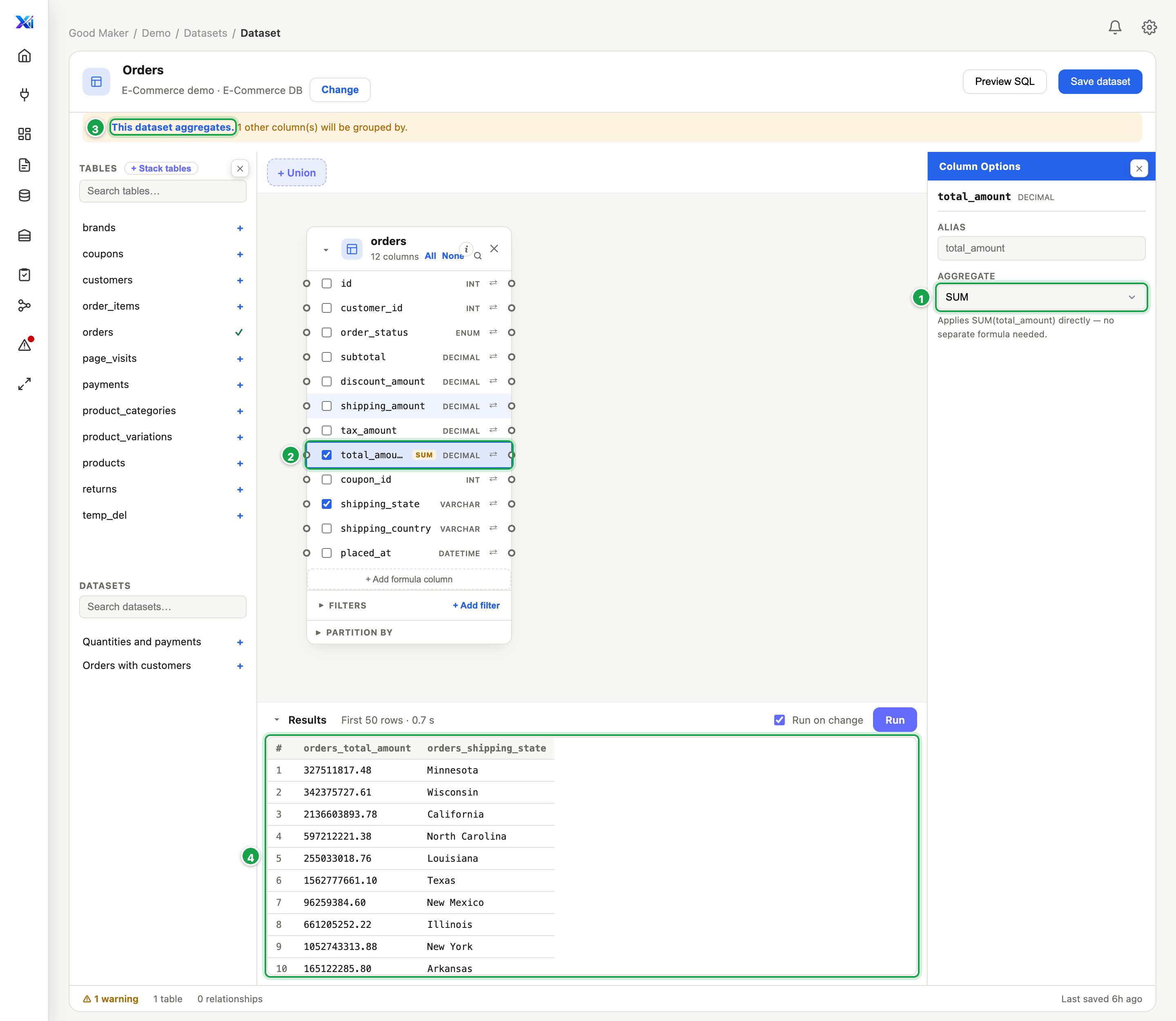
| # | What it is |
|---|---|
| 1 | Aggregate: SUM, AVG, COUNT, COUNT DISTINCT, MIN or MAX |
| 2 | The column now shows SUM |
| 3 | Every other ticked column is grouped by |
| 4 | One row per state, with its total |
One row per value, with no total: Group by
To list unique values, say every document number once, set the column’s Aggregate to Group by. Any column can do this, text included. You get one row per value. Every other ticked column without a total is grouped too, so ticking customer as well gives one row per document number and customer.
What “grouped by” means
Every other ticked column becomes a grouping. With region, month and SUM of amount, you get one row per region and month, with the total amount.
So tick only the columns you want to break totals down by. Every extra column means more rows.
Things to know
- Other number columns are summed too. When you turn this on, Analytics sets the other ticked number columns to SUM as well. Set any of them back to None to group by it instead.
- Only number columns offer the totals (SUM, AVG…); every column offers Group by. If a column that holds numbers doesn’t offer it, the database stores it as text. Add a formula column that converts it (Custom formula
CAST(amount AS DECIMAL(18,2)), Data type number) and summarise that. - Details you leave out are gone. A report on this dataset can’t split totals by a column the dataset didn’t keep. If people need product later, keep product here.
- An average of averages is not the overall average. If reports will total things up again, prefer SUM and COUNT here, and divide in the report.
Next: 03.7 Filters and parameters
Last updated 12 October 2026