
04.9 Row tags
A row tag gives a row a short name, like A1 for Category A › Sub-category x, or N for every North row. The tag follows the values, not the position, so it stays on the right row after every refresh.
Tags show in the table and in Excel and PDF exports, e.g. North [N].
Tag a row
- Open the report in design mode with grouped rows (04.4).
- Right-click a value in a grouping column (e.g. a sub-category).
- In the Tag dialog:
- Name 1: Analytics suggests one. Use letters and digits, starting with a letter, up to 24 characters, unique in this report.
- Choose what it matches:
- Whole hierarchy 2: this exact row (e.g. A › x)
- Just this value: every row with this value, wherever it sits (e.g. every North)
- Custom: tick the levels yourself under Match rows where 3
- Check Shows as 4 for a preview.
- Click Tag 5, then Save the report.
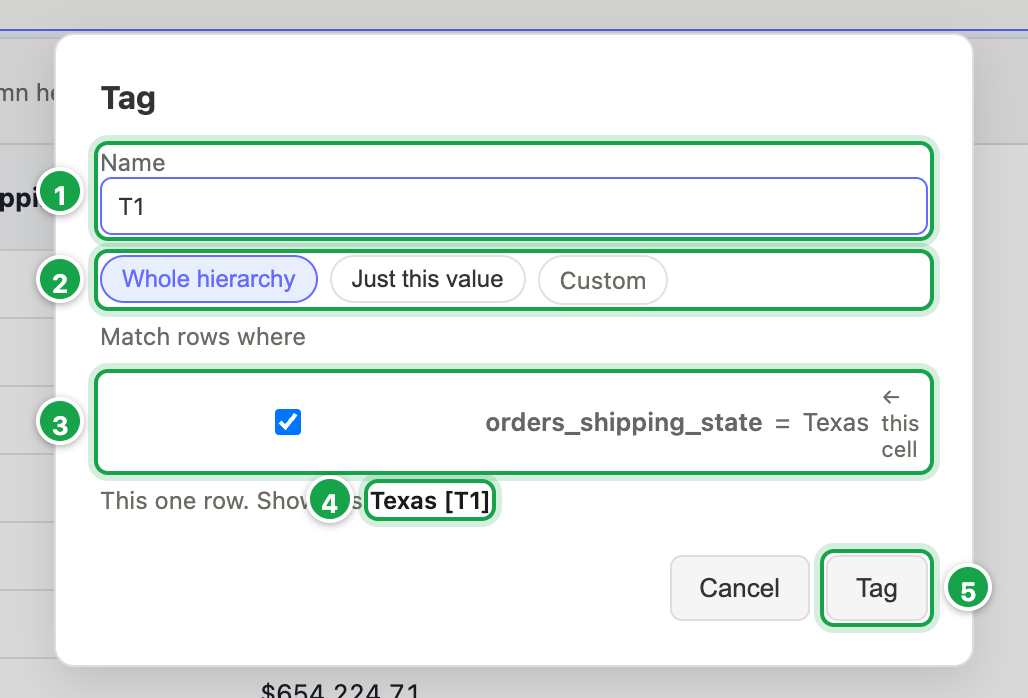
| # | What it is |
|---|---|
| 1 | Name: suggested for you |
| 2 | Whole hierarchy, Just this value, or Custom |
| 3 | Match rows where: the levels the tag tests |
| 4 | Shows as: how the cell will read |
| 5 | Tag |
Manage tags
The Row tags icon (design mode) opens the tag list:
- Show tags in the table and exports: switch them on or off.
- Template: how a tag appears, e.g.
{{value}} [{{tag}}]gives North [N]. Anything else you type is shown as written. - Click a tag’s name to rename it. ✕ removes it.
- Each tag shows its status:
- OK
- Broken: a column it uses is no longer in the report. Pick its replacement from the list.
- Matches N rows: a whole hierarchy tag now matches several rows, usually because a grouping level was added above it.
- Not in this data: nothing matches under the current filters.
Copy tags to another report or widget
- Save the report first.
- Copy tags to… → pick a report or widget.
- Check the column matches. Pick a column or Skip for ones that don’t match.
- If a name already exists there: Copy as X_2, Replace theirs or Keep theirs.
- Tick And remove them here to move rather than copy.
Copying a widget to another dashboard takes its tags with it.
Next: 04.10 Run and export
Last updated 12 October 2026