
Report across a many-to-many relationship
Customers and sales by state, when both tables have many rows per state. Join them directly and every order is counted once per customer. Here is how to build the report so each number is counted once.
The question
For each state: how many customers do we have, how many orders did they place, how much did we sell, and what is that per customer?
The answer needs two tables: customers, which has a state, and orders, which has a shipping_state. Both have many rows for every state. That makes the link between them many-to-many.
Why a plain join gets it wrong
Joining customers.state to orders.shipping_state pairs every customer in a state with every order shipped there.
Take Vermont in the demo data:
| In the tables | After the join | |
|---|---|---|
| Customers | 363 | 854,865 rows, one per customer and order |
| Orders | 2,355 | each order repeated 363 times |
| Sales | $25,003,868.16 | about $9.08 billion (363 × the real figure) |
Every total is multiplied by the number of rows on the other side. Nothing warns you: the numbers just come out far too big. Across all 50 states the join is billions of rows, so it is also slow.
The rule: a join is safe when at least one side has one row per key. An order joined to its customer (one customer per order) is fine. Two tables that both have many rows per key are not.
The fix: one row per key on both sides
You build three small datasets and join them at the end:
- Customers per state and Sales per state: each table grouped down to one row per state.
- Every state: the list of states, each once, taken from both tables.
- Customers and sales by state: the state list, with both grouped datasets joined to it.
Every join in step 3 is one-to-one, so nothing is repeated.
1. Group each side down to one row per state
Customers per state
- Make a dataset on the customers table (03.2) and tick only
stateandid. - Click
stateand set Aggregate to Group by 1. That gives one row per state (03.6). - Click
id, set Aggregate to COUNT 2 and Alias tocount3. - Save. The results show 50 rows, one per state 4.
A dataset names each result column after its card: customers_state and customers_count here. Those are the names you join on and pick later.
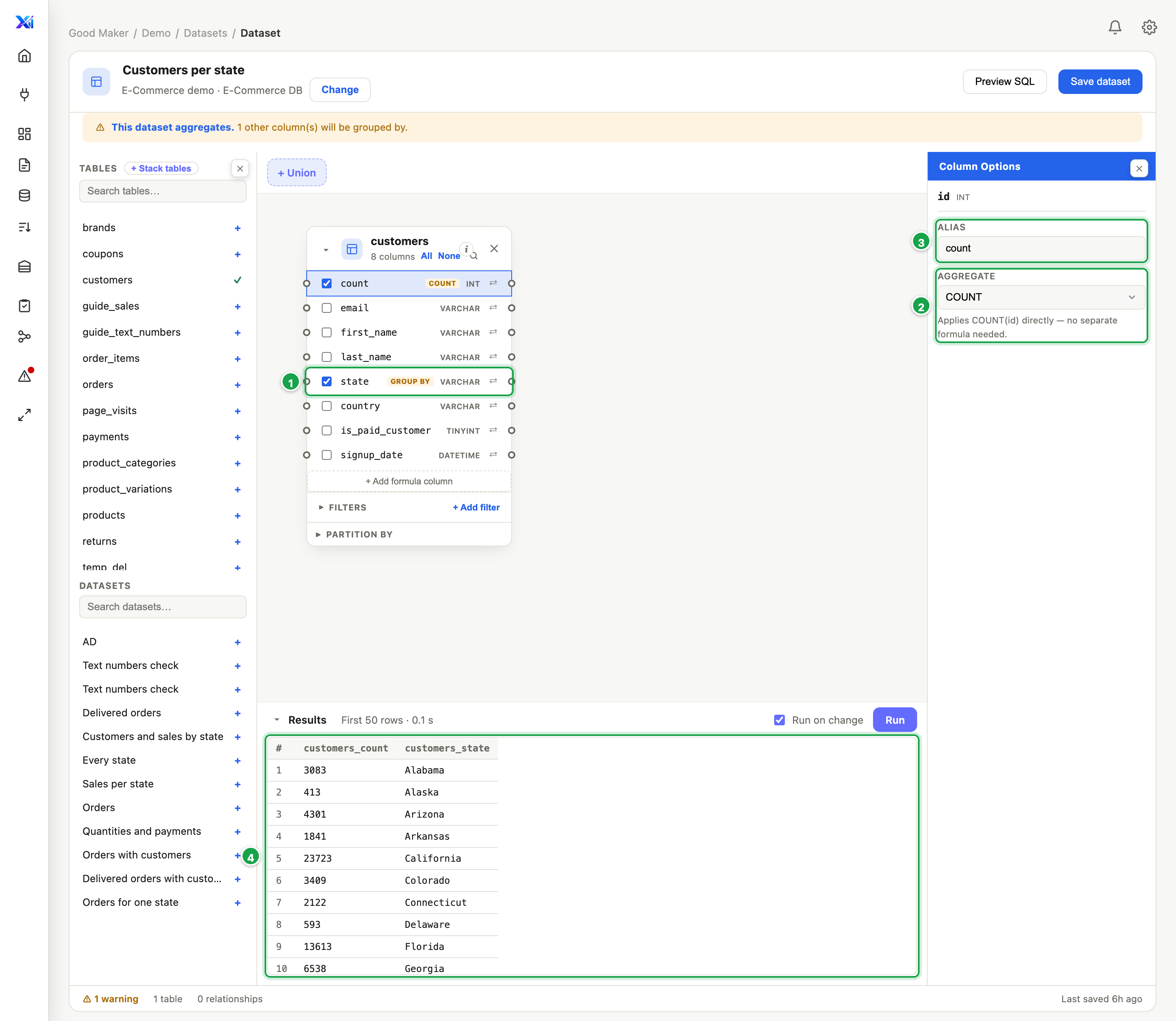
| # | What it is |
|---|---|
| 1 | state: Group by, one row per state |
| 2 | id: COUNT |
| 3 | Alias count: the result names it customers_count |
| 4 | The result: one row per state, its customers |
Sales per state is the same on the orders table:
shipping_state: Group by, Aliasstate, givingorders_statetotal_amount: SUM, Aliassales, givingorders_salesid: COUNT, Aliascount, givingorders_count
Each of these is now one row per state. You can check either on its own: Vermont shows 363 customers, and 2,355 orders worth 25,003,868.16.
2. List every state once
Join the two grouped datasets directly and a state that appears on only one side drops out, e.g. a state with sign-ups but no orders yet. To keep every state, start from a list of all the states, each once:
- Make a dataset Every state on the customers table and tick only
state. This is Part 1 1. - Click + Union 2 and add the orders table as Part 2. Tick only
shipping_state3. - Set the mode to UNION 4, not UNION ALL. UNION drops duplicates, so each state is listed once (03.8).
The stacked column takes Part 1’s name: customers_state.
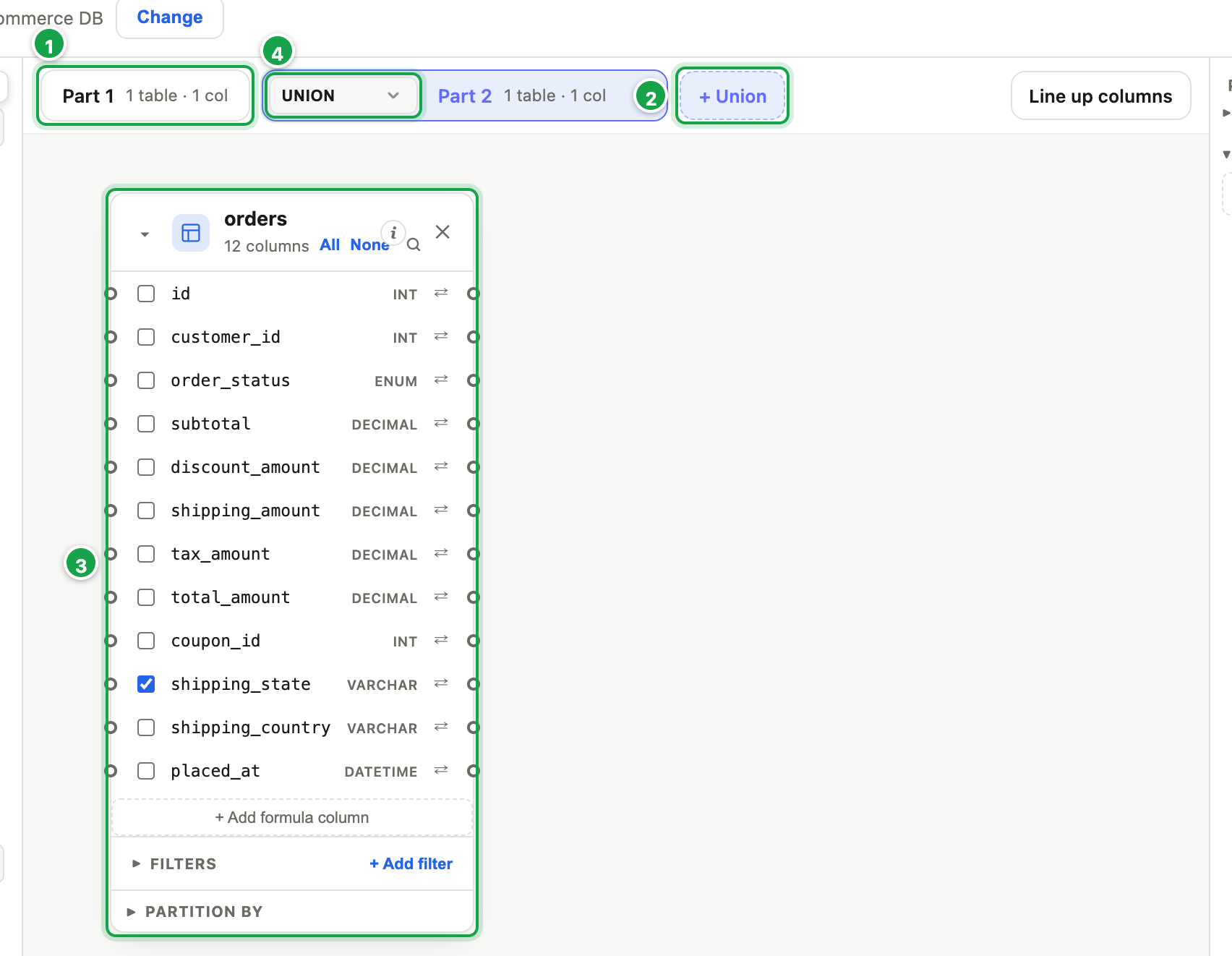
| # | What it is |
|---|---|
| 1 | Part 1: customers, state only |
| 2 | + Union: add Part 2 |
| 3 | Part 2: orders, shipping_state only |
| 4 | UNION: each state once |
In the demo data both tables have the same 50 states, so the list is 50 rows either way. With real data, keys missing on one side are common, and this step is what keeps them in the report.
You can skip step 2 when a table already holds every key exactly once, e.g. a
statestable. Start from that table instead.
3. Join both to the list
- Make a dataset Customers and sales by state and place Every state from the Datasets list on the left 1 (03.11).
- Place Customers per state and Sales per state the same way.
- Join Every state’s
customers_stateto Customers per state’scustomers_state, and to Sales per state’sorders_state2. Make both Left joins, so every state in the list stays (03.3). - Keep
customers_countfrom the first andorders_countandorders_salesfrom the second; untick their state columns, which repeat the list’s. Save.
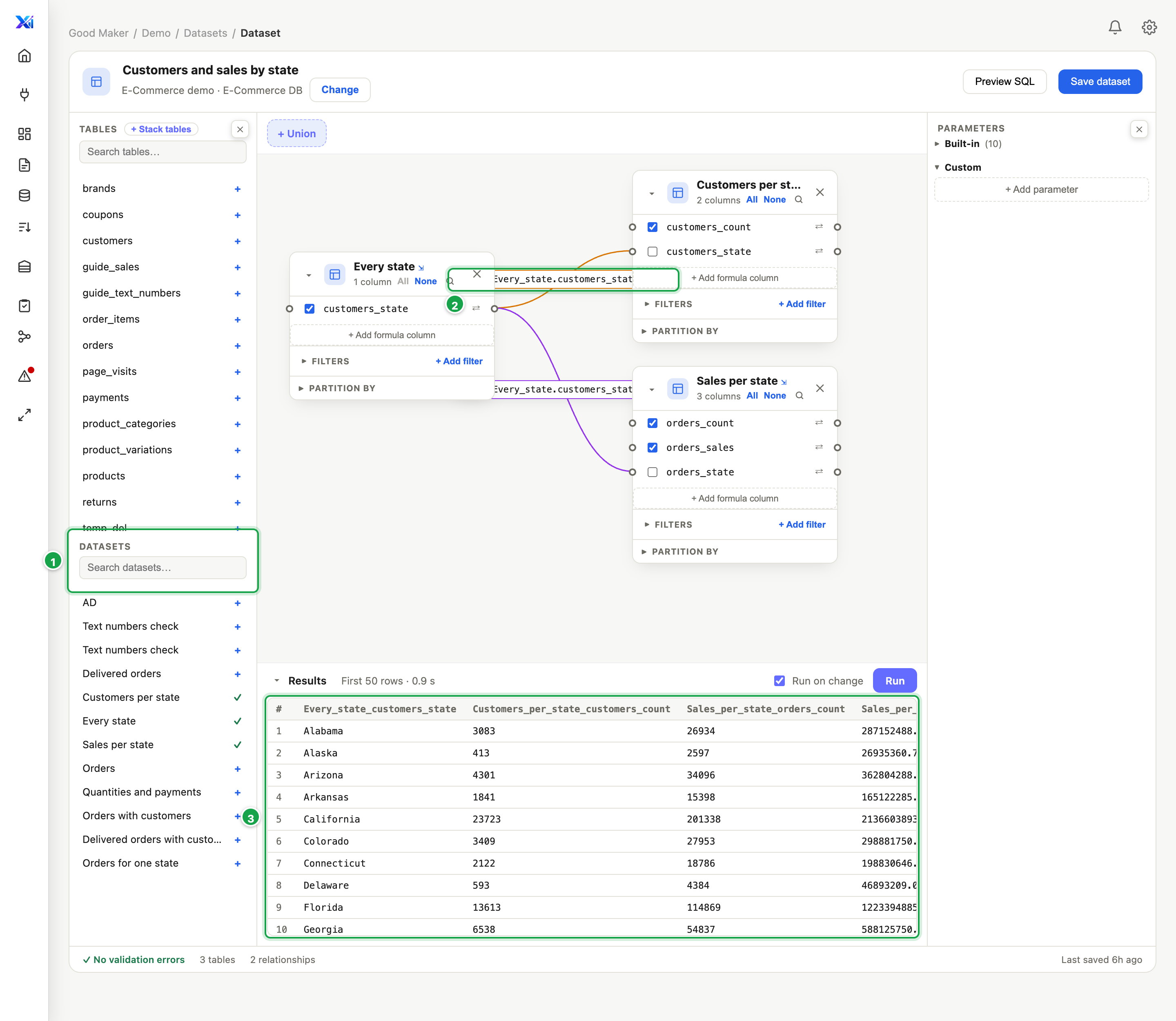
| # | What it is |
|---|---|
| 1 | Datasets: place each one from here |
| 2 | Left joins on the state, from the state list |
| 3 | One row per state: customers, orders, sales |
The result is one row per state with all three numbers 3, each column named after the dataset it came from: Every_state_customers_state, Customers_per_state_customers_count, Sales_per_state_orders_count, Sales_per_state_orders_sales. A state missing from one side shows an empty value there instead of disappearing.
The report
Make a report on Customers and sales by state (04.2):
- Rows: the state 1.
- Values: the customer count, the order count and the sales, each Sum 2. Every state is one row, so the sum is the number itself, and the Grand total adds the states up correctly 3.
- Give the columns short headings with Alias (State, Customers, Orders, Sales) (04.3).
- For the average, add a formula column: sales divided by customers (04.7).
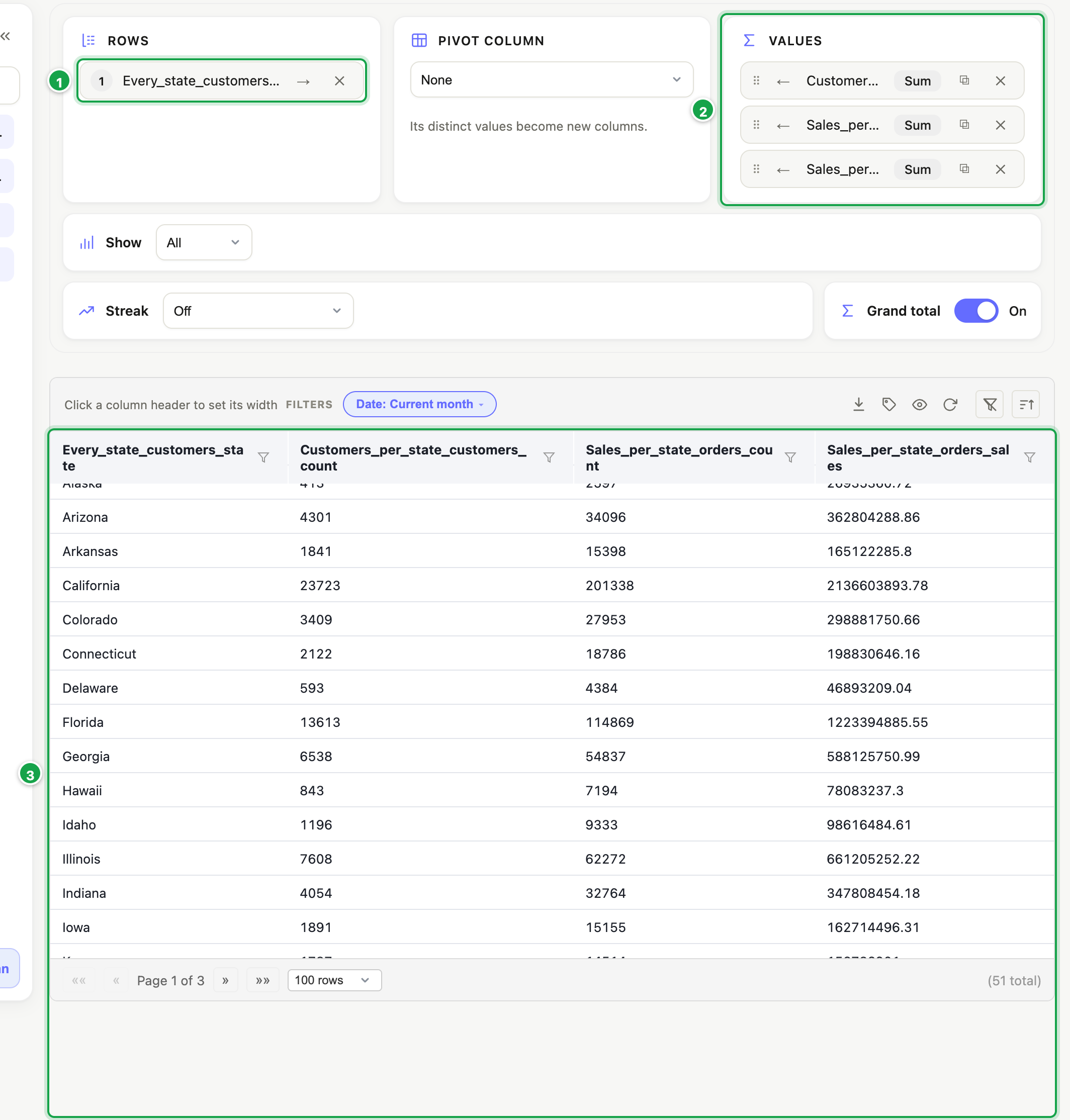
| # | What it is |
|---|---|
| 1 | Rows: the state |
| 2 | Values: customers, orders, sales (Sum) |
| 3 | One row per state, and a grand total that adds up |
Check it: Vermont reads 363 customers, 2,355 orders, 25,003,868.16 in sales, and about 68,881 per customer.
The same recipe elsewhere
Whenever two tables share a key and both have many rows per key, group each side to that key first, list the keys once, then join:
- Products and campaigns: units sold per product, and page views per product
- Students and courses: enrolments per course, and lessons taught per course
- Projects and staff: hours booked per project, and invoices per project
- Warehouses and suppliers: stock per warehouse, and deliveries per warehouse
If the key is a date, group both sides to the same grain (day, month) before you join.
Last updated 14 October 2026